Wednesday, February 25, 2015

Beam, a smart projector you’ll want to have
Beam Smart Projector can project images from the standard light socket

Beam, a smart projector you’ll want to have

When you say Screw it! You don’t normally refer to the niceties that can occur in various situations, but there’s something that could give a new meaning to the phrase. Meet Beam, a smart projector that you could use in your day to day activities and can be controlled via smartphone or tablet. It’s a projector you can fit in the old light socket, the same one you would normally screw a lightbulb into. Apparently, projectors can be fitted almost anywhere, from cameras to phones, books, car seats, ceilings, and on, so why hasn’t anyone come up with the idea of a projector in a lightbulb I don’t know…Fortunately, the Beam Smart Projector provides that big screen image like a bigger, bulkier projector would show on a flat surface, but it does that while inserted into the standard light socket.
Inside a nice enough looking casing lies a decent projector for its size, equipped with a smart computer. With this Beam is capable to support games and content from the smartphone or tablet, but most of all, it is capable of playing movies or projecting images. It can assist you in your daily activities like waking you up in the morning with the weather forecast and discreet news information, or show you your agenda or the latest social updates when you arrive home. It has an included power cable as well to place it onto any flat surface and is easy to set up and control thanks to the Apple or Android app. Beam is another internet of things gadget that could be integrated into a home or office, designed to assist you through the day’s course.
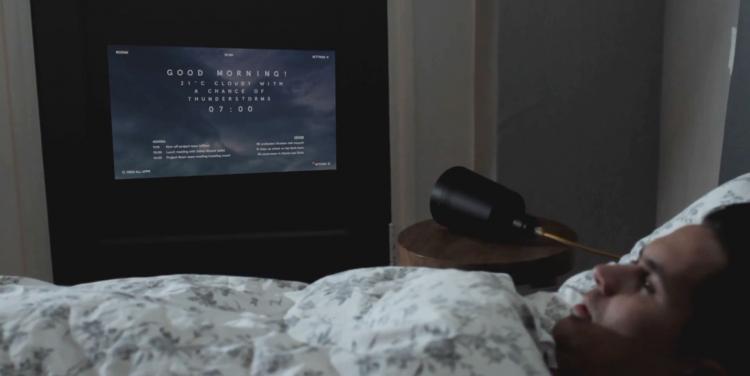
Beam is a smart-projector that screws into any light socket
Beam is a smart projector that assists you in many ways
Supporting AirPlay and Miracast, the projector is running on Android but it’s not picky with the iPhone as it connects to one as well. There’s a 1.3 Ghz dual-core processor pumping the little computer inside, 8 GB internal storage, 802.11n Wi-Fi and Bluetooth 4.0. The resolution is a LED Pico projector of 854×480 pixels, 100 Lumen and 20.000 projection hours. Two 2 watt speakers (each) add to the specs list and the E26/E27 light socket that draws its power from.

Will Apple have trouble with its smartwatch?

Will Apple have trouble with its smartwatch?

Will Apple have trouble with its smartwatch?


Apple has been working for four years on the smartwatch that will be in stores in April. The project was difficult for the company because Apple would have liked to add more sensors to measure the health status of the users, but it failed. The watch will measure the number of steps and the pulse rate, but will not be able to measure blood sugar levels, blood pressure and stress levels because the tests with various sensors were unsatisfactory, writes the Wall Street Journal.
WSJ informs that the development of the long-awaited smartwatch started four years ago and although it’s something normal that Apple experiments a lot with any type of product, the watch development was not easy and consumed a large quantity of financial resources. The project became controversial even inside the company. Why was everything so difficult? Because when Apple started to work on the smartwatch, they wanted to create a complex device to measure many things related to the health of the wearer like blood pressure, blood sugar or stress levels. None of these functions will be present because either the sensors provided misleading results, or they would have been too complex to be added to the watch.
For example, Apple would have wanted to have watch sensors that can measure skin conductivity, give accurate data about the stress levels of the wearer, the process being similar to that of a lie detector. But the tests proved that the values displayed did not work properly for those with hair on the body or for those with dry skin. Apple would have also wanted to put the sensors for measuring blood sugar levels without collecting blood, but technically this is extremely difficult and the results were inconsistent. The company would have planned to add a sensor for measuring the blood pressure, but this also has proved to be unviable. If we think that the digital blood pressure monitors are sometimes inaccurate, it’s not hard to realize that for a small smartwatch, this would have been even more difficult to calculate with accuracy.
Because they could not add all the sensors they had planned initially, the watch became a big problem for Apple. The company could not use the idea of focusing on measuring specific indicators of health. However, the smartwatch offers something for everybody: it is fashion accessory, has the ability to act as a complimentary device to the iPhone, it has support for Apple Pay or can can measure the daily physical activity of the wearer. It’s not exactly revolutionary, but given the tendency of consumers to purchase Apple product, it’s hard to imagine it flopping financially.

Moto X 2014 vs Nexus 6 – Specs, Camera and Prices Compared


Moto X 2014 vs Nexus 6 – Specs, Camera and Prices Compared

Moto X 2014 vs Nexus 6 – Specs, Camera and Prices Compared


Google’s Nexus 6 smartphone is many things, but despite appearances one thing it’s not: an over-sized Moto X (2014). It’s understandable why some might think that the second gen Moto X is more similar to the Nexus 6 than it actually is. Size difference aside, many of the cosmetic ques are identical, from the aluminum mid-plate to the curved chassis, from the cameras ring flash to the front facing speakers right down to the signature Motorola Logo on the back. In the hand, they do feel similar, again with the exception of the Nexus 6’s massive footprint, but those similarities are only skin deep.
That skin is the first major difference here, using Motorola’s Moto Maker Suite. The Moto X (2014) is available in 520 different color combinations, in everything from plastic to wood to 2 types of leather. The customization extends to personalized branding on the back and special greetings up-front, all coming together to make the Moto X feel more personal.

By contrast the Nexus 6 is available in just 2 shades of somewhat slippery matte plastic. Even the parts of the hardware that seem identical, aren’t. And here is where the Nexus 6 gains some ground. The Nexus comes with duo front-firing speakers instead of the Moto X’s single one, and its camera bears optical image stabilization where as the X’s does not. The Nexus 6 includes a bundle turbo charger in the box and wireless charging support, while the Moto X (2014) always requires wires, and if you want to turbo charge it you will need pay extra $35.
Aside from the obvious differences in display size and pixel density, the Nexus 6 also brings a nice touch with its panel with the ability to go super dim for night time readers. You can accomplish a similar effect with Screen Dimmer app on the Moto X, but it’s nice to have this out of the box on the Nexus 6. The Nexus 6, being a Google smartphone, promises faster Android updates than any other smartphone, so you can count that as an extra point for the Nexus 6. Motorola is pretty fast to push updates to its X line too (due to the fact that Motorola like to keep its personalized UI as close to raw Android as possible), but the Nexus is a clear winner here. Owning a Nexus device still feels like being part of somewhat an exclusive club, while there’s a certain fun-factor in owning a Moto X.
Let’s talk about optics and cameras. Though they offer identical resolutions, the Sony camera sensors used in these two flagships are not the same. The Nexus 6 packs the newer sensor (Sony IMX 214) with a wider aperture of F/2.0 and is power by the Google Camera finder. The Moto X packs the Sony IMX 135 with F/2.25. Neither have the best software for shooting, but the Nexus’ is probably the easier one to adapt to. The Nexus 6 camera is the one I prefer overall, and is the one that generally provides better results, especially in the hands of a user not particularly fascinated by photography.
The Nexus 6 also brings practical superiority over the Moto X (2014) in a few ways. First of all, 2 speakers on the front are much better than 1, and a bigger/newer phone means bigger storage, newer specs and a bigger battery. With neither of these offering microSD expansion, you will want all the storage you can get. The Nexus 6 goes up to 64 GB while the Motorola Moto X maxes out at 32 GB (although there are limited editions that come with 64 GB, however, these are not commonly available outside specific regions and carriers). In terms of internal hardware, the Nexus 6 brings the Snapdragon 805 versus the Moto X’s Snapdragon 801 and 3 GB of RAM versus 2 GB. You might think that the Nexus 6 is better in some high-end games and you might think it is snappier than the Moto X, but the Moto X actually runs smoother in most scenarios. Surprising, but it is what it is.
Overall the Moto X is more comfortably sized for one handed use and yet stills packs a display that is large enough for most tastes and needs. Between the Nexus 6 and the Moto X (2014), I would recommend the Moto X, however, both smartphones are solid choices and stomp many competitors into the ground. Ultimately, it also comes down to pricing, with a standard 16 GB Moto X (2nd gen) costing $399 carrier-free, while the Nexus 6 is considerably more expensive at $649 for the 32 GB model. There’s quite a gap in pricing there, one that the Nexus 6 simply can’t justify, so unless you have money to throw away, do yourself a favor and opt for a Moto X. Heck, you can even get the biggest available storage and best trims for the phone and still walk away with a better deal.

Sunday, February 22, 2015

‘The LEGO Movie Video Game’ for iOS game review

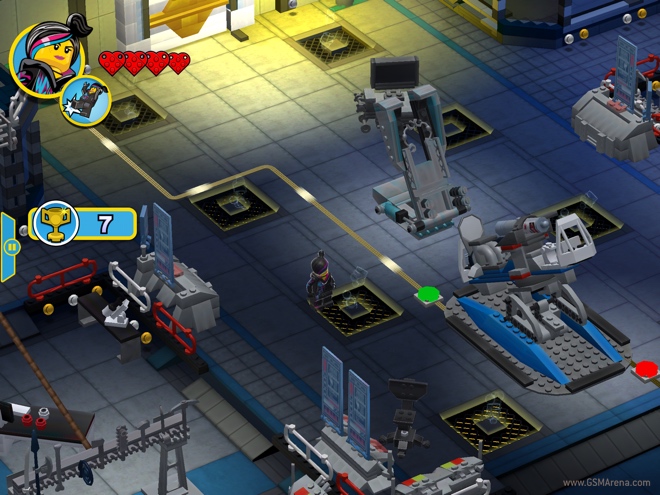
The LEGO Movie Video Game is a video game based on the LEGO Movie (shocking, I know). It’s essentially a top-down isometric action-adventure game based on the story and characters of last year’s successful LEGO Movie.

A version of this game was released on the PC and consoles but is different from the iOS version, which has been made from the ground up for the mobile platform. The gameplay is somewhat similar but it is mostly just cutscenes from the movie interspaced with several short levels featuring the movie’s characters.

Gameplay

As mentioned, The LEGO Movie Video Game is a third person action adventure game. The game’s story is told through sequences lifted straight from the movie, so it’s best if you have watched the movie first if you A. Don’t want it to be spoiled and B. Want to enjoy the game properly.

Between the cutscenes, are 45 levels, which sounds like a lot but most of them are very short. You play as one of the many characters in the game, each having some special abilities other than the basic movement and attack functionality. The characters get unlocked as the game progresses but you can also purchase them using in-game currency or using real money.

Most of the gameplay is going around fixing things and building objects and paths and then moving on to the next area. Occasionally you will find some enemies but they can be dispatched easily by hitting them a couple of times. The game also has achievements, which are given depending upon how well or how quickly you perform certain tasks.

‘Game of Thrones – A Telltale Games Series – Episode 2′ for iOS and Android game review

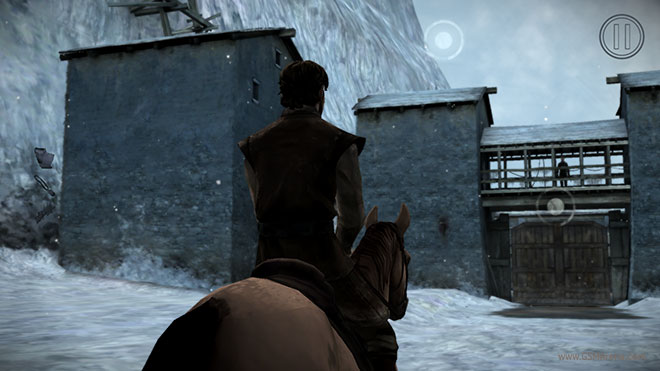
Telltale has released the next episode in its Game of Thrones series of games. Called The Lost Lords, it is the second episode in the six part series based on the hit HBO show, Game of Thrones, which itself is based on the A Song of Ice and Fire series of books by George R. R. Martin.

The episode 2 continues from where the first episode left off, which we reviewed here. Episode 1 started off on a strong mark, so let’s see if episode 2 can keep the momentum going.

Gameplay

Note: Spoilers for episode 1 ahead. If you haven’t played episode 1, I strongly suggest you do before reading the review.
Episode 2 starts soon after the ending of the first episode, which ended in a typical Game of Thrones fashion, with the gruesome death of Ethan Forrester. The season introduces Asher Forrester, who is returning to Ironwrath with Malcolm Branfield. Meanwhile, Mira Forrester continues to form an alliance with Tyrion Lannister over at King’s Landing. On the other side, Gared Tuttle goes to The Wall, where we also get our first glimpse of Jon Snow in the game. There are other important events that take place in this episode, but they are best left to be discovered by the player.

Gameplay-wise, the game is more or less the same, featuring the typical point and click adventure style of Telltale games. You tap on marked objects to interact with them, and you interact with characters with through set options, which you have to select. As you make choices, you alter the game’s progress and how the next series of events take place.
The game also has several quick time events, where you have to tap or swipe at the right time in the right direction during the fight sequences. The second episode adds a new timed button, where a button appears on the screen but you can’t press it until the right moment. If you press it early or late, then you basically fail the event.

This is where my main problem with the game comes in. For a game that requires so heavily on quick time events, there is an annoying delay between pressing or swiping on the screen and the game actually accepting the input. I also often found the game ignoring a perfectly well timed input, causing the event to fail. This wasn’t a problem with episode 1, which works fine.

Google Now lets you toggle Wi-Fi, Bluetooth, and the flashlight with voice commands

On Android, Google Now serves as the virtual assistant Siri is on iOS and Cortana is on Windows Phone. Thus, Google Now can take voice commands and act on them. But up until recently that did not include toggling certain system settings – not directly, at least.

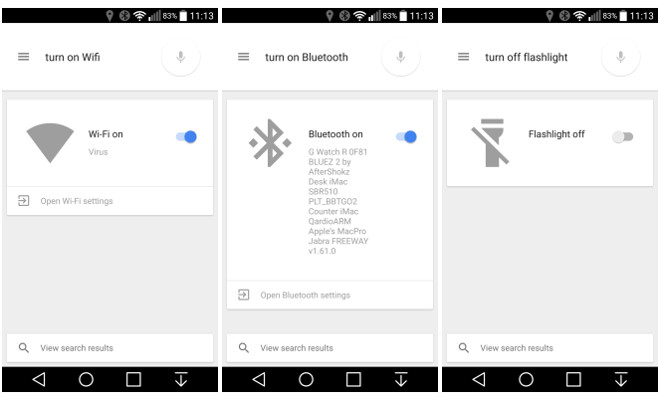
The good news is that as of this moment Google Now is in fact able to toggle your Wi-Fi and Bluetooth connections on or off, as well as the flashlight functionality enabled by your phone’s LED flash. The one caveat is that you need to be running Android 5.0 Lollipop.
Before, if you told Google Now to “turn Wi-Fi off” for example, it would simply take you to the relevant menu inside Settings (and this is still what happens if you use Google Now on older versions of the OS). That was reasonably helpful, but the new functionality is much more so.
Now when you tell it to turn Wi-Fi on or off, it simply does that. And the situation is identical for Bluetooth and the flashlight. Interestingly, the flashlight toggling works even on devices that have had the corresponding functionality removed from the Quick Settings by their manufacturer. The LG G3 fits this description, for example. This creates an odd situation where for such handsets the only way to trigger the flashlight function built into Android 5.0 Lollipop is by voice.
Once you’ve told Google Now what to do, you get audio feedback letting you know that the action has been performed, as well as a card and a small toggle (as you can see from the screenshots above). The toggle that’s displayed helps you quickly revert an action if you made a mistake.
For now just these three commands work like this. Trying to directly toggle Airplane mode, Location, Brightness, or Volume via voice results in you being taken to the appropriate Settings menus – just what used to happen for Wi-Fi, Bluetooth, and the flashlight too. So hopefully more direct voice toggles will be enabled in the future.

‘Alto’s Adventure’ for iOS game review

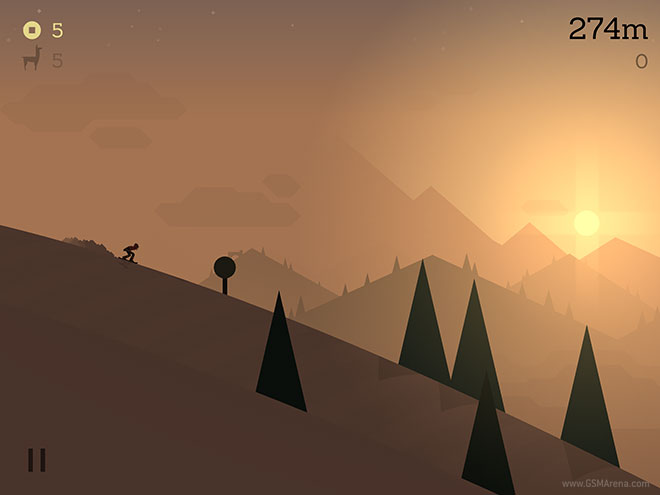
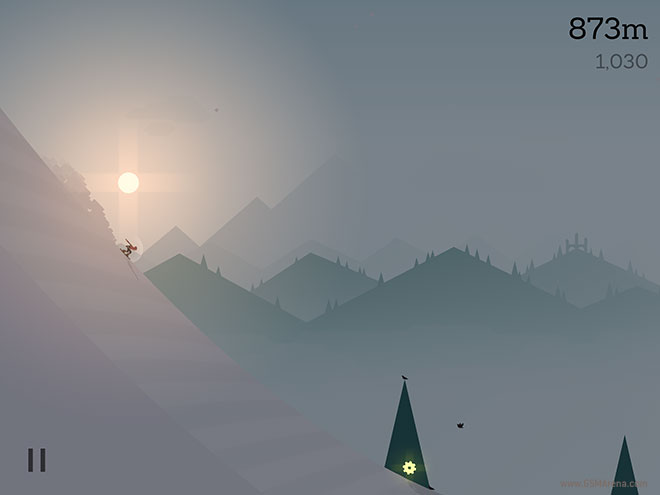
Alto’s Adventure is procedurally generated endless snowboarding game. You play as Alto and his friends, going down snow covered slopes on snowboards, catching llamas, grinding on rooftops, and pulling off stunts in mid-air.

The game is now available on the App Store and promises beautiful visuals and an exhilarating gameplay experience. Let’s see if it delivers.

Gameplay

In Alto’s Adventure, you play as one of the six characters in the game, with the first character (Alto) available at the beginning and more unlocking as you reach the next level.

The character automatically goes down the slope and you have only one control at your disposal, which allows the character to jump. If you press and hold on the screen, the character attempts to perform a backflip mid-air. If you manage to straighten the character before landing back you successfully perform a flip, otherwise you crash in the snow and the game ends.

The way jumps are performed reminds me a bit of Tiny Wings. As you are going down the slope, you are looking for those small mounds that will allow you to jump in the air and hopefully perform a flip.

Samsung Galaxy A7 hands-on

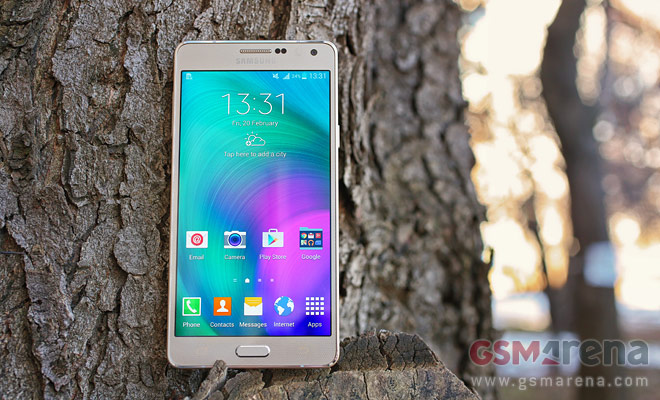
Sometimes you have to start fresh to get it right, that’s what Samsung did with the Galaxy A series. They are all thin, with metal frames and go against Samsung’s very nature – they focus on looks and feel more than on features. Even so, the Samsung Galaxy A7 is pretty well loaded.
Samsung Galaxy A7 hands-on
It’s a 5.5″ phablet that serves as a mid-range alternative to the Galaxy Note 4.
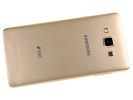
The Galaxy A7 is more than 2mm thinner and a good 35g lighter than its well-known cousin. Other than that it has roughly the same design with a metal unibody – though for all we can see, the back panel does not look as metal convincingly enough. The thing is, it’s not removable but it still flexes a bit under pressure. It also doesn’t feel as cold to the touch as the metal frame around the sides.
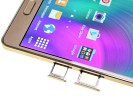
The unit we have with us is the dual-SIM model (Galaxy A7 Duos) and it has two slots – one is a regular nanoSIM, while the other either holds a second nanoSIM or a microSD (whichever you choose but not both).
Samsung Galaxy A7 hands-onSamsung Galaxy A7 hands-on
Two slots for card that can hold two SIMs or SIM+microSD
The Samsung Galaxy A7 features a 5.5″ Super AMOLED screen with 1080p resolution. That gives it a pixel density of 401ppi, below the 515ppi of the Galaxy Note 4 though it won’t get many (any?) complaints. There’s no S Pen stylus like on the Notes though. Samsung didn’t make a Neo version of the Galaxy Note 4 so this generation is without a mid-range phablet with an S Pen.
 https://www.youtube.com/watch?feature=player_embedded&v=jOv0Uurklkk
Samsung Galaxy A7 hands-onSamsung Galaxy A7 hands-onSamsung Galaxy A7 hands-on
A 5.5″ Super AMOLED with 1080p resolution
Anyway, the version we’re testing, the dual-SIM 3G one, is powered by a Snapdragon 615 chipset (octa-core Cortex-A53). The same goes for the dual-SIM LTE option. The single-SIM LTE phone packs an Exynos 5430 (quad Cortex-A15 plus quad A7), the same chipset as the Galaxy Alpha.
The Exynos chipset performed great when we tested it on the Alpha, though with the flexibility of the dual-SIM version the Snapdragon 615 looks like a safe bet too. It’s a 64-bit chipset unlike the Exynos, which will become increasingly important for Android in the future.
The Samsung Galaxy A7 is very light (141g) and thin (6.3mm) so it never feels bulky in the hand. The matte back does a great job of hiding fingerprints and is smoothly rounded near the edges so it feels even thinner. It is not a small phone, yet it comes with the same features for one-handed use that the Galaxy Note 4 has.
Samsung Galaxy A7 hands-onSamsung Galaxy A7 hands-onSamsung Galaxy A7 hands-on
The Galaxy A7 is large but thin
The camera sticks out the back though and not by a little. It’s a 13MP camera that records 1080p video and is flanked by a solitary LED flash and loudspeaker.
The front-facing camera shoots 5MP selfie photos and 1080p videos. The selfie camera has a wide-angle lens too, 106°, so you can get several of your friends and take a groupie. The Wide selfie mode helps make selfeis even wider with a panorama-like shooting.
Samsung Galaxy A7 hands-onSamsung Galaxy A7 hands-on
The phone is thin, everywhere but the camera, which protrudes significantly
The retail box comes with the usual accessories – a one-piece headset, a SIM ejector tool, a microUSB cable and a charger. The charger puts out 1.55A, which isn’t enough for Qualcomm’s Quick Charge and there’s no mention of it in the specs either.
Samsung Galaxy A7 hands-onSamsung Galaxy A7 hands-on
A standard retail package
The Samsung Galaxy A7 will soon join its A5 and A3 siblings in our review section, stay tuned as we toil on the full length article.

Motorola Moto X (2014) with Android Lollipop battery life test

Motorola has already updated its Moto X 2nd Gen (2014) with the latest Android Lollipop build and we’ve decided to run our battery life tests again. Lollipop brings a number of improvements including a number of battery optimizations combined under what’s known as Project Volta.
We’ve already detailed Volta’s features and you can read more about them right here.

In our previous tests with phones that recently got updated to Lollipop we weren’t able to determine a specific pattern in the change in battery life – some of the phones did better in talk time or web browsing, some did worse. It seems every device behaves differently under Lollipop OS, so we really had no clue what to expect from the updated Moto X 2nd Gen.
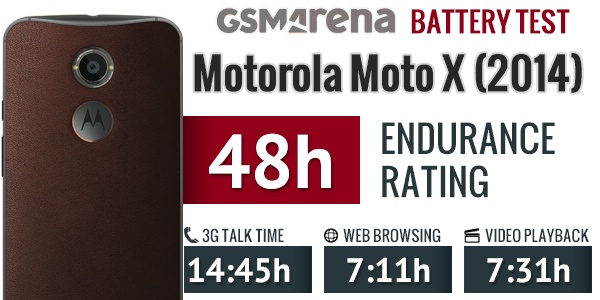
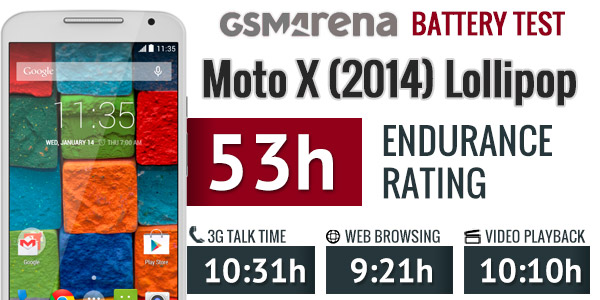
We put the Lollipop-treated Moto X 2nd Gen through our 3G talk time test and surprisingly, its battery went flat some good four hours earlier than it did under Android KitKat.


Talk time

  • Motorola Moto X (2014) (KitKat) 14:15
  • Motorola Moto X (2014) (Lollipop) 10:31
The overall web browsing performance has improved though and now the Moto X can last 2 hours more under normal browsing usage.

Web browsing

  • Motorola Moto X (2014) (Lollipop) 9:21
  • Motorola Moto X (2014) (KitKat) 7:11
The video playback has received a bump as well with extra two and a half hours on a single charge. Now your Lollipop-running Moto X 2nd Gen is capable of lasting 10 hours and then some when it comes to watching movies.

Video playback

  • Motorola Moto X (2014) (Lollipop) 10:10
  • Motorola Moto X (2014) (KitKat) 7:31
The Lollipop update allowed for slightly better standby endurance, which isn’t displayed in our scorecard but is calculated into the final endurance rating.


So in the end, despite in the drop in talk time, the Moto X 2nd Gen scored a 5-hours longer endurance rating under Android Lollipop thanks to its better scores on web browsing, video playback and standby endurance. The above battery performance means that the device will make it through two days and five hours of usage is you use it for an hour each of telephony, web browsing and video playback daily.
By the way, we’ve just updated our Moto X (2014) review with new camera and video samples, benchmark scores, loudspeaker results, display performance, so you may want to stop by and check it out again.

 
Mehedi Hasan Pritom - Md.Moniruzzaman Monir